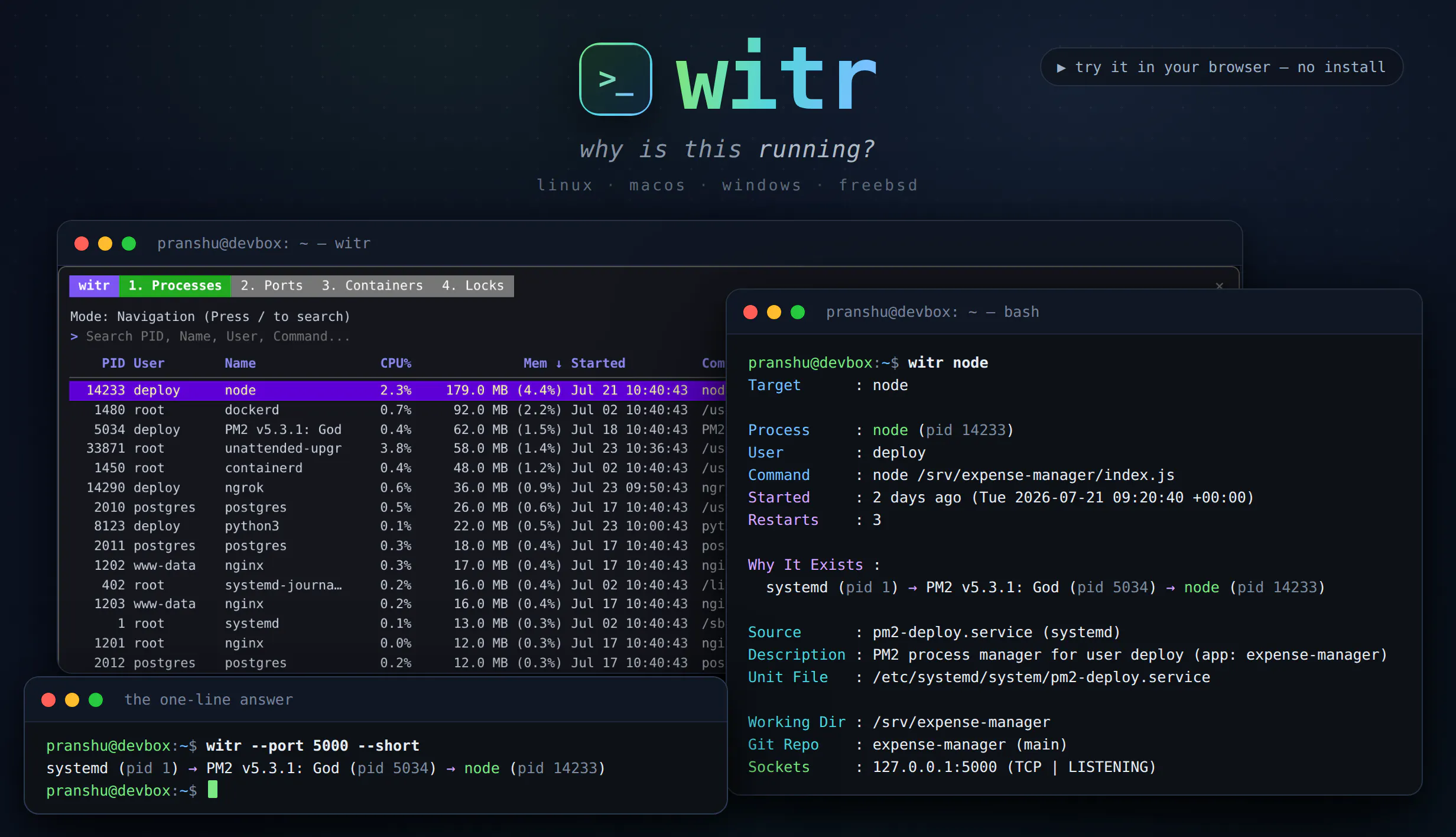
ps, top and lsof tell you what is running. witr tells you why. Point it at a process, PID, port, container or file and it traces the chain that explains it - systemd, supervisor, shell or cron - plus who started it, when, from where, and the warnings worth knowing. Run it bare for an interactive TUI with Processes, Ports, Containers and Locks tabs. Or script it: --short for a one-line chain, --json with real exit codes. One static Go binary for Linux, macOS, Windows and BSD.
Hey Product Hunt!
I built witr out of a recurring annoyance: you find something running - a process eating CPU, a port that's already bound, a container you don't remember starting - and every tool tells you what it is, but nothing tells you why it's there.
ps, top, lsof and systemctl all answer "what". witr answers "why". Give it a name, PID, port, container or file and it walks the ancestry chain back to whatever is actually responsible - a systemd unit, a supervisor, a cron job, a shell session, a container runtime - and shows who started it, when, from where, and anything worth knowing (running as root, bound to 0.0.0.0, deleted binary, LD_PRELOAD set, restarting in a loop).
Run it with no arguments and you get an interactive TUI with Processes, Ports, Containers and Locks tabs, live search and an ancestry side panel. Or script it: --short gives a one-line chain and --json comes with meaningful exit codes.
It's a single static Go binary, Apache-2.0, running on Linux, macOS, Windows and FreeBSD. Every operation is read-only, so it's safe to point at production.
If you'd rather try before installing, there's a browser playground with a guided tutorial: https://pranshuparmar.github.io/...
Would love feedback.
The “unknown” state feels really important for a tool like this. In prod I’d rather see “can’t prove the chain past this point” than a confident-looking guess, especially around PID reuse or containers.
Filing Asad's bug within hours of him raising it says more about where this tool will be in a year than the feature list does.
One push on the product itself. The chain answers what started it. It does not answer why, and you have named the tool after the harder claim.
systemd started it because a unit file says so. The real why is whether anyone still wants it running, and that lives outside the box entirely.
So the output I would value most is the inverse of ancestry. This is running, and nothing on this machine explains why it still should be. Started from a shell session that ended months ago. Unit enabled by someone who has left. Container from a compose file that is no longer in the repo.
That is the thing I actually go hunting for at 2am, and nothing tells me.
Is orphan detection something the ancestry data you already collect could support?
The Locks tab caught my eye. Does it cover advisory file locks (flock/fcntl) alongside mandatory ones, or is it scoped to one type? I work with Node.js processes sharing a SQLite file across workers, and the symptoms are usually slow queries rather than visible contention. Knowing whether witr can show which worker holds a read vs write lock on a specific file path would be the thing that saves me reaching for strace.
witr looks fantastic. Huge congrats on shipping, and best of luck with the launch! 🚀
How deep does it trace - down to which file handle or socket a process holds? That's usually the part I'm actually hunting for.
ps and lsof telling me what but never why is a decent chunk of my debugging life. Two questions. Does the Containers tab pick up things Docker Desktop started, and does it do anything sensible under WSL2 where there's no systemd to trace back to? That's usually where I lose the thread.
How do you handle cases where a process has been re-parented, daemonized, or launched through several abstraction layers? I’m curious how WITR communicates uncertainty when it can reconstruct only part of the original startup chain.
the single static Go binary shipping for linux, mac, windows and bsd with no runtime dependencies is the kind of boring, disciplined execution that makes a tool actually pleasant to drop on any box
This solves something I've dealt with too many times chaining lsof, ps, and systemctl manually just to trace who actually started a process. The ancestry chain approach (systemd → supervisor → cron → shell) is exactly the missing piece.
for containers, does it trace through to the host-level process, or stop at "docker started this"?
Trying the playground now. Nice work.
The PID reuse case is the one I'd want to understand. Linux recycles PIDs pretty fast under load, so if I point witr at a PID that already exited and got reused by something unrelated, does it know the two are different processes, or could it walk an ancestry chain that's actually stitched together from two different processes that happened to share a number?
The thing that'll decide whether I keep it is what it prints when the chain dead ends. A process reparented to init after its parent died, or something started inside a container runtime that hides the real caller, and the honest output there is that it can't tell you. Tools like this get uninstalled the moment they guess once and someone acts on the guess. The --json exit codes are the right instinct, so give the unknown case its own code instead of folding it into success.
About witr on Product Hunt
“Why is this running? Trace process, port, container or file”
witr launched on Product Hunt on July 31st, 2026 and earned 150 upvotes and 35 comments, placing #7 on the daily leaderboard. ps, top and lsof tell you what is running. witr tells you why. Point it at a process, PID, port, container or file and it traces the chain that explains it - systemd, supervisor, shell or cron - plus who started it, when, from where, and the warnings worth knowing. Run it bare for an interactive TUI with Processes, Ports, Containers and Locks tabs. Or script it: --short for a one-line chain, --json with real exit codes. One static Go binary for Linux, macOS, Windows and BSD.
witr was featured in Linux (7.8k followers), Open Source (69k followers), Developer Tools (522.5k followers) and GitHub (41.5k followers) on Product Hunt. Together, these topics include over 144.8k products, making this a competitive space to launch in.
Who hunted witr?
witr was hunted by Pranshu Parmar. A “hunter” on Product Hunt is the community member who submits a product to the platform — uploading the images, the link, and tagging the makers behind it. Hunters typically write the first comment explaining why a product is worth attention, and their followers are notified the moment they post. Around 79% of featured launches on Product Hunt are self-hunted by their makers, but a well-known hunter still acts as a signal of quality to the rest of the community. See the full all-time top hunters leaderboard to discover who is shaping the Product Hunt ecosystem.
Want to see how witr stacked up against nearby launches in real time? Check out the live launch dashboard for upvote speed charts, proximity comparisons, and more analytics.

 Pranshu Parmar