Why is this running? Trace process, port, container or file
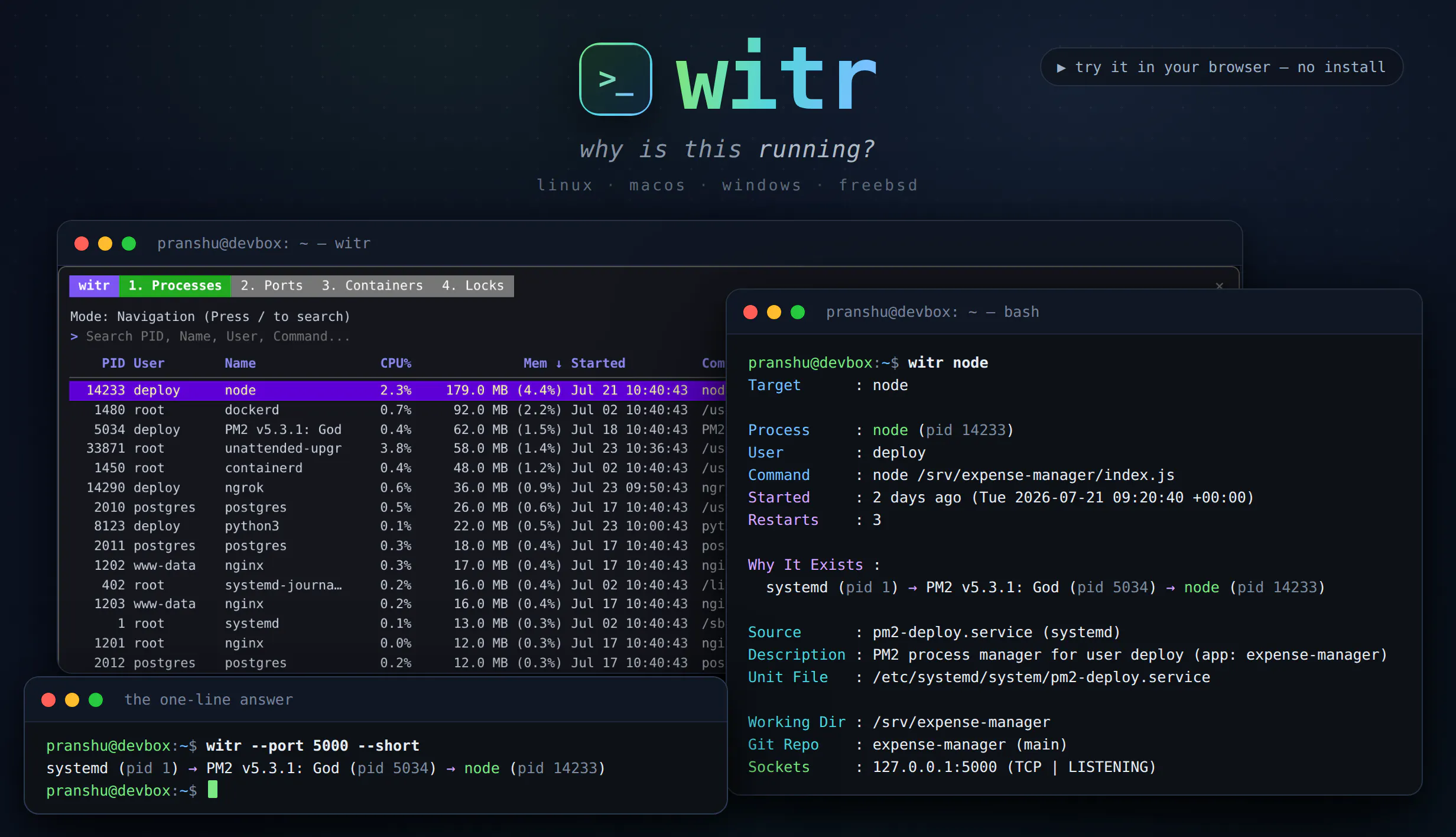
ps, top and lsof tell you what is running. witr tells you why. Point it at a process, PID, port, container or file and it traces the chain that explains it - systemd, supervisor, shell or cron - plus who started it, when, from where, and the warnings worth knowing. Run it bare for an interactive TUI with Processes, Ports, Containers and Locks tabs. Or script it: --short for a one-line chain, --json with real exit codes. One static Go binary for Linux, macOS, Windows and BSD.
Hey Product Hunt!
I built witr out of a recurring annoyance: you find something running - a process eating CPU, a port that's already bound, a container you don't remember starting - and every tool tells you what it is, but nothing tells you why it's there.
ps, top, lsof and systemctl all answer "what". witr answers "why". Give it a name, PID, port, container or file and it walks the ancestry chain back to whatever is actually responsible - a systemd unit, a supervisor, a cron job, a shell session, a container runtime - and shows who started it, when, from where, and anything worth knowing (running as root, bound to 0.0.0.0, deleted binary, LD_PRELOAD set, restarting in a loop).
Run it with no arguments and you get an interactive TUI with Processes, Ports, Containers and Locks tabs, live search and an ancestry side panel. Or script it: --short gives a one-line chain and --json comes with meaningful exit codes.
It's a single static Go binary, Apache-2.0, running on Linux, macOS, Windows and FreeBSD. Every operation is read-only, so it's safe to point at production.
If you'd rather try before installing, there's a browser playground with a guided tutorial: https://pranshuparmar.github.io/...
Would love feedback.
About witr on Product Hunt
“Why is this running? Trace process, port, container or file”
witr launched on Product Hunt on July 31st, 2026 and earned 150 upvotes and 35 comments, placing #7 on the daily leaderboard. ps, top and lsof tell you what is running. witr tells you why. Point it at a process, PID, port, container or file and it traces the chain that explains it - systemd, supervisor, shell or cron - plus who started it, when, from where, and the warnings worth knowing. Run it bare for an interactive TUI with Processes, Ports, Containers and Locks tabs. Or script it: --short for a one-line chain, --json with real exit codes. One static Go binary for Linux, macOS, Windows and BSD.
On the analytics side, witr competes within Linux, Open Source, Developer Tools and GitHub — topics that collectively have 640.8k followers on Product Hunt. The dashboard above tracks how witr performed against the three products that launched closest to it on the same day.
Who hunted witr?
witr was hunted by Pranshu Parmar. A “hunter” on Product Hunt is the community member who submits a product to the platform — uploading the images, the link, and tagging the makers behind it. Hunters typically write the first comment explaining why a product is worth attention, and their followers are notified the moment they post. Around 79% of featured launches on Product Hunt are self-hunted by their makers, but a well-known hunter still acts as a signal of quality to the rest of the community. See the full all-time top hunters leaderboard to discover who is shaping the Product Hunt ecosystem.

 Pranshu Parmar