This product was not featured by Product Hunt yet. It will not be visible on their landing page and won't be ranked (cannot win product of the day regardless of upvotes).
Vexy Lines
Turn any image into expressive, editable vector art
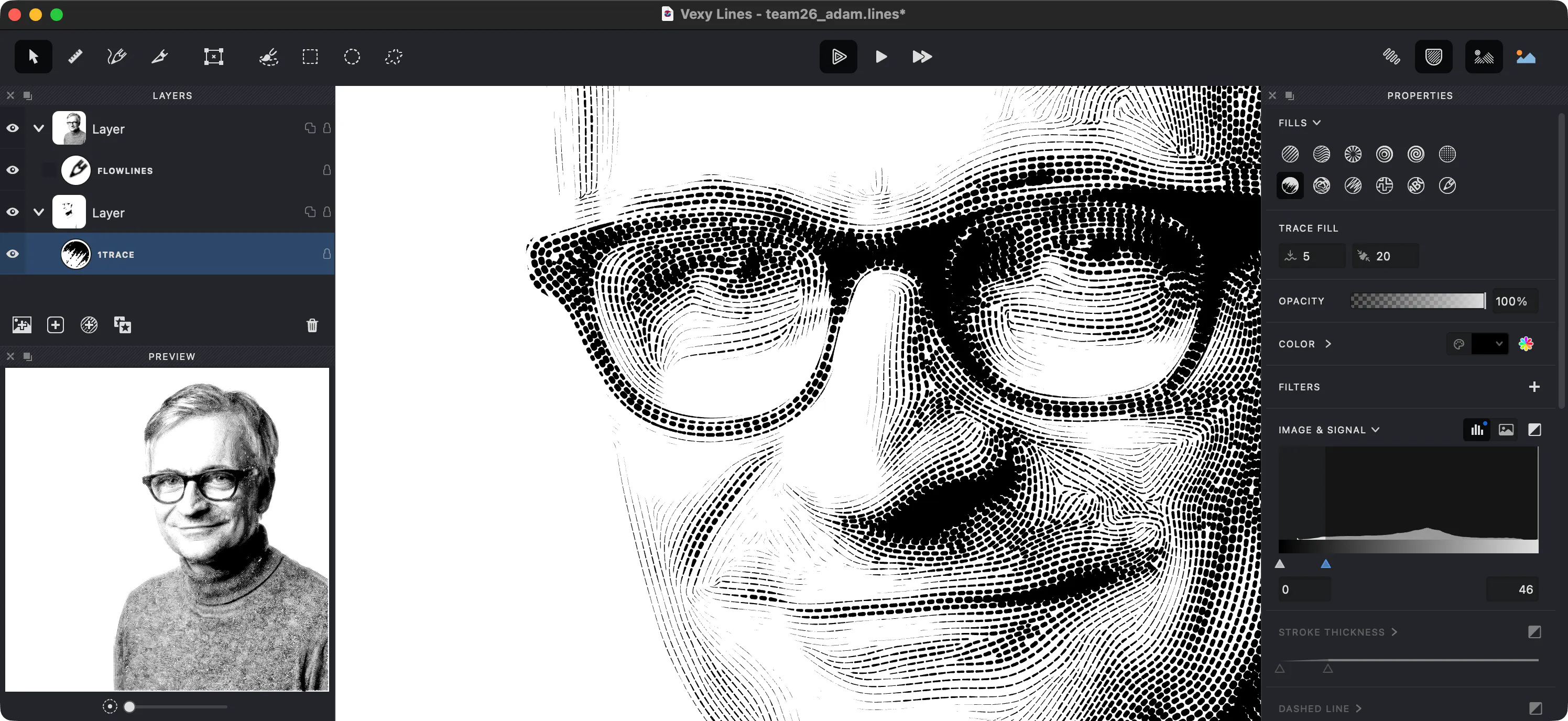
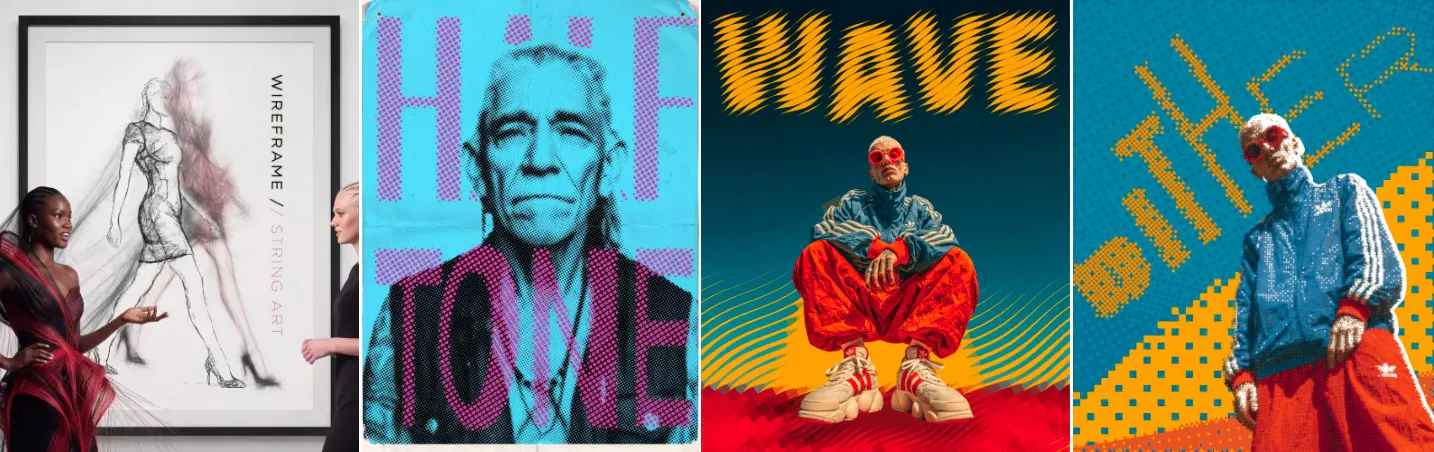
Vexy Lines is a desktop vector studio for Mac and Windows that transforms photos, sketches and AI images into expressive, print-ready artwork. Choose from 12 algorithmic fills—including engraving lines, waves, halftone dots, scribbles and text—then stack layers, paint masks, warp meshes and refine every stroke. Export crisp SVG, PDF, EPS, PNG or JPEG. Try every feature free; unlock export with a $99 lifetime license.
Hey Product Hunt 👋
We’ve always been fascinated by what happens when pixels become structure—not just a trace, but lines, waves, dots, letters and patterns that carry the tone and character of the original image.
The idea began with Strokes Maker, released by Dmitry Apanovich in 2007. Vexy Lines is its complete rewrite: a focused desktop studio for Mac and Windows that transforms photos, sketches and generated images into editable, print-ready vector artwork.
What makes Vexy Lines different from a one-click vectorizer:
✺ 12 algorithmic fill styles, including engraving, waves, halftone, trace, scribble and text
✺ Multiple fills, layers, groups and paintable masks
✺ Dynamic colors sampled directly from the source image
✺ Mesh warping, perspective and automatic hidden strokes
✺ Handmade vector strokes for final refinements
✺ SVG, PDF and EPS export for print, screen printing, vinyl cutting and engraving
✺ Fully offline operation after activation
You can explore every feature for free, with no time limit. Export unlocks with a $99 lifetime license—no subscription.
We’d love your honest feedback: what would you make with Vexy Lines, and which fill style catches your eye first?
— Adam, Yuri, Dima & the FontLab team
I love Vexy Lines. It is now an integral part of my hybrid poster design process. Some things are just not feasible without it.
Hello all, I’m Adam from the team that created Vexy Lines. I’ve been co-developing the FontLab font editor for two decades now. And I’ve co-created a number of font families: Lato (with Łukasz Dziedzic), Zapfino Extra (with Hermann Zapf), Milka (with Botio Nikoltchev), Agmena (with Jovica Veljović), Zeitung Pro (with Underware), Helvetica World (with Tiro Typeworks). I contributed to Arial and Times New Roman for Microsoft.
Overall, I’m a typography & typeface person at heart. So when my colleagues at my company Fontlab Ltd. developed the Vexy Lines app as a side project — initially I was skeptical. Cross-hatching? Engraving? Halftoning? That sounds nice — but how does this relate to what our users do?
Yeah, that’s me ↑
After a few weeks with Vexy Lines, I got hooked and immersed!
I think this app is just as typographic as FontLab or TransType. Vector line patterns and halftones are all about smooth vectors and about rhythm — just like digital fonts. :)
Visit vexy.art and try out Vexy Lines (the standalone app for Mac & Windows), Vexy Linestra (the Adobe Illustrator plugin for hatching, engraving and halftoning) and the free Vexy Playlines web app!
Best, Adam Twardoch Fontlab Ltd.
About Vexy Lines on Product Hunt
“Turn any image into expressive, editable vector art”
Vexy Lines was submitted on Product Hunt and earned 17 upvotes and 3 comments, placing #30 on the daily leaderboard. Vexy Lines is a desktop vector studio for Mac and Windows that transforms photos, sketches and AI images into expressive, print-ready artwork. Choose from 12 algorithmic fills—including engraving lines, waves, halftone dots, scribbles and text—then stack layers, paint masks, warp meshes and refine every stroke. Export crisp SVG, PDF, EPS, PNG or JPEG. Try every feature free; unlock export with a $99 lifetime license.
Vexy Lines was featured in Design Tools (263.8k followers), Art (20.2k followers) and Graphics & Design (4.4k followers) on Product Hunt. Together, these topics include over 54.5k products, making this a competitive space to launch in.
Who hunted Vexy Lines?
Vexy Lines was hunted by Yury Yarmola. A “hunter” on Product Hunt is the community member who submits a product to the platform — uploading the images, the link, and tagging the makers behind it. Hunters typically write the first comment explaining why a product is worth attention, and their followers are notified the moment they post. Around 79% of featured launches on Product Hunt are self-hunted by their makers, but a well-known hunter still acts as a signal of quality to the rest of the community. See the full all-time top hunters leaderboard to discover who is shaping the Product Hunt ecosystem.
Want to see how Vexy Lines stacked up against nearby launches in real time? Check out the live launch dashboard for upvote speed charts, proximity comparisons, and more analytics.


 Yury Yarmola