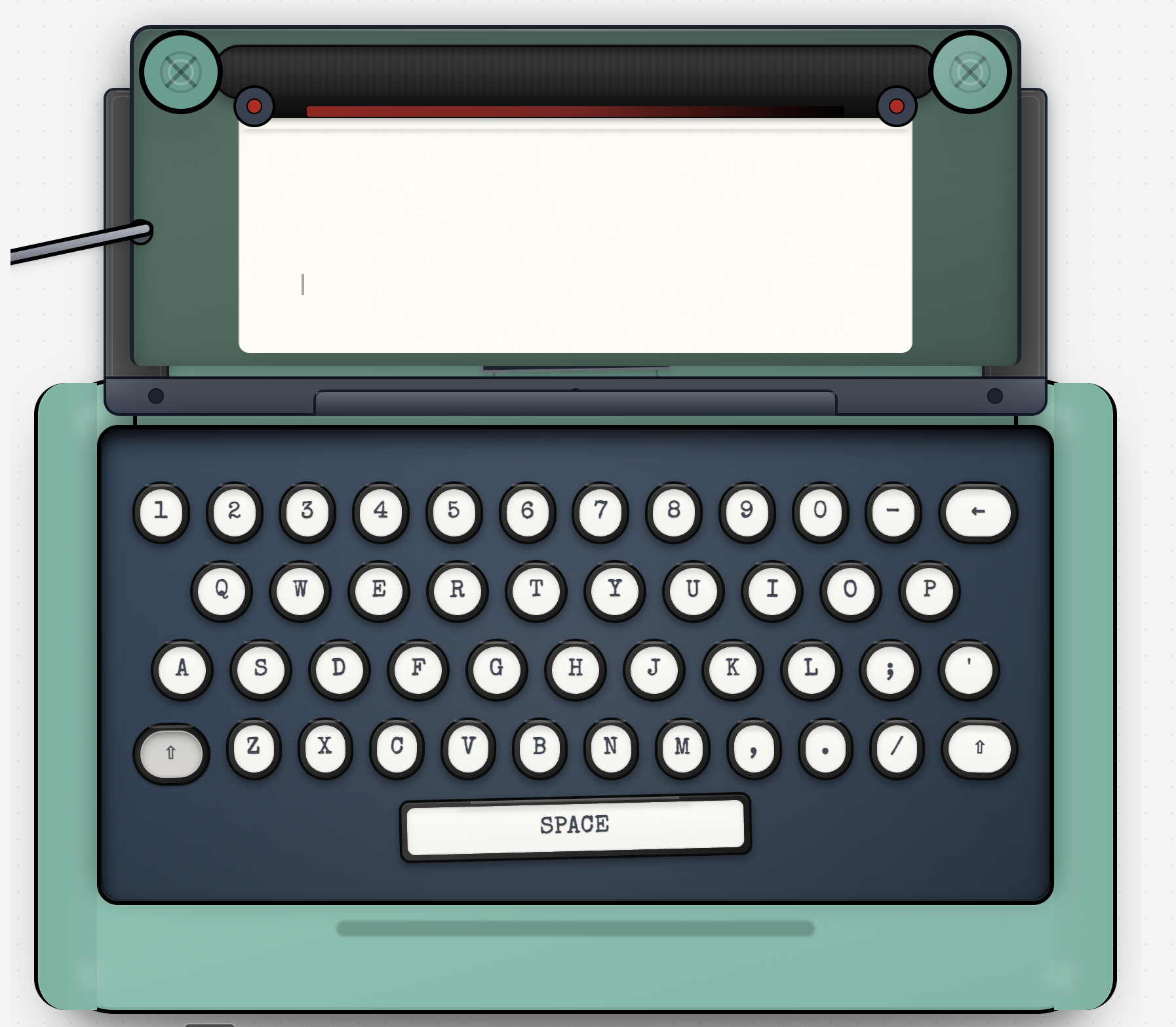
Turn your browser into a cozy, nostalgic writing nook for letters, journals, and thoughts you’ve been meaning to write. Typeletter mimics the feel of a real typewriter: clacky keys, carriage return lever, scroll knob, without any setup or sign-up. Pick your ink ribbon (Black, Red, Blue, Sepia), choose an ambience like Rain, Beach, Jazz, or Park, and just start typing from the heart. When you’re done, hit “finish” to email your note, download it as a beautiful image with wax seal stamps.
I built Typeletter because I missed sending thoughtful notes.
The kind you’d write slowly. The kind that carry feeling not polish.
There’s something about old letters and typewriters that made words feel more intentional. You paused before typing. You thought about what you wanted to say. The sound of the keys reminded you that this was real.
Typeletter is my attempt to bring a bit of that back.
A small, quiet space to write soulful notes, to yourself or to someone else, without distractions. Just a page, the rhythm of keys, and a sense of nostalgia that invites you to slow down. If you wanna feel the vibe, tune in to the ambience of a park, beach, jazz hall, or a rainy evening.
What Typeletter lets you do:
- Write soulful notes in a quiet, distraction-free space
- Type on a classic, vintage-style typewriter
- Hear the soft rhythm of typewriter keys as you write
- Choose ink colors: black, blue, red, sepia
- Add gentle ambient sounds (rain, beach, jazz, park)
- Mark your note with a seal or stamp, like old letters
- Sign your note, if you want it to feel personal
- Send a note by email, when it’s ready
- Save your words as a simple image keepsake
- Time Capsule: schedule a note to be delivered in the future
I made this because I wanted writing to feel personal again.
If it helps you send or write something that matters, I’m glad it exists.
I just tried this, it was there in their newsletter. And I LOVE IT!!
Can you also add
an option to make it fullscreen so the instructions on the left vanish and we have a full typewriter on the entire screen
An option to change the sound of the keystrokes as well, right now the keys sound like I'm typing on mobile
Add a couple options to make it easier for day-to-day use rather than just something for feel-good writing, like a database that stores my writing kind of like Notion. This would make it my go-to option every single day ❤️
that's so cute!! tried it out once, now I need me an actual typewriter haha :) congrats on the launch!
Congrats on the launch! I gave Typeletter a try, and I found it very relaxing. It’s refreshing to see a product that focuses on meaningful writing and reflection.
I did feel there was a very slight input lag, and over time maybe it could use some more ambience options, like maybe a forest? Or the city? All in all, it’s a very nice product!
I genuinely love it, but I am not so sure whether I want to go back to that era as a writer. One mistake and you could start writing over again :D
Browser-based “typewriter” apps hit scale pain when exporting high-res images and audio ambience cause memory spikes and jank on low-end devices.
Best practice is OffscreenCanvas for render-to-image, preloading audio with the Web Audio API and limiting concurrent buffers, plus local autosave in IndexedDB to avoid losing drafts on refresh.
How are you implementing the Time Capsule scheduled email delivery without accounts, and do you encrypt drafts or email payloads client-side to keep the no-signup privacy promise?
About Typeletter on Product Hunt
“Turn your browser into a cozy, nostalgic writing nook”
Typeletter launched on Product Hunt on February 13th, 2026 and earned 143 upvotes and 10 comments, placing #10 on the daily leaderboard. Turn your browser into a cozy, nostalgic writing nook for letters, journals, and thoughts you’ve been meaning to write. Typeletter mimics the feel of a real typewriter: clacky keys, carriage return lever, scroll knob, without any setup or sign-up. Pick your ink ribbon (Black, Red, Blue, Sepia), choose an ambience like Rain, Beach, Jazz, or Park, and just start typing from the heart. When you’re done, hit “finish” to email your note, download it as a beautiful image with wax seal stamps.
Typeletter was featured in Productivity (662k followers), Writing (59.4k followers) and Tech (633.6k followers) on Product Hunt. Together, these topics include over 346.7k products, making this a competitive space to launch in.
Who hunted Typeletter?
Typeletter was hunted by Aishwarya Ashok. A “hunter” on Product Hunt is the community member who submits a product to the platform — uploading the images, the link, and tagging the makers behind it. Hunters typically write the first comment explaining why a product is worth attention, and their followers are notified the moment they post. Around 79% of featured launches on Product Hunt are self-hunted by their makers, but a well-known hunter still acts as a signal of quality to the rest of the community. See the full all-time top hunters leaderboard to discover who is shaping the Product Hunt ecosystem.
Want to see how Typeletter stacked up against nearby launches in real time? Check out the live launch dashboard for upvote speed charts, proximity comparisons, and more analytics.

 Aishwarya Ashok
