This product was not featured by Product Hunt yet. It will not be visible on their landing page and won't be ranked (cannot win product of the day regardless of upvotes).
TerminalMoses
Parting the sea of logs for developers who hate scrolling
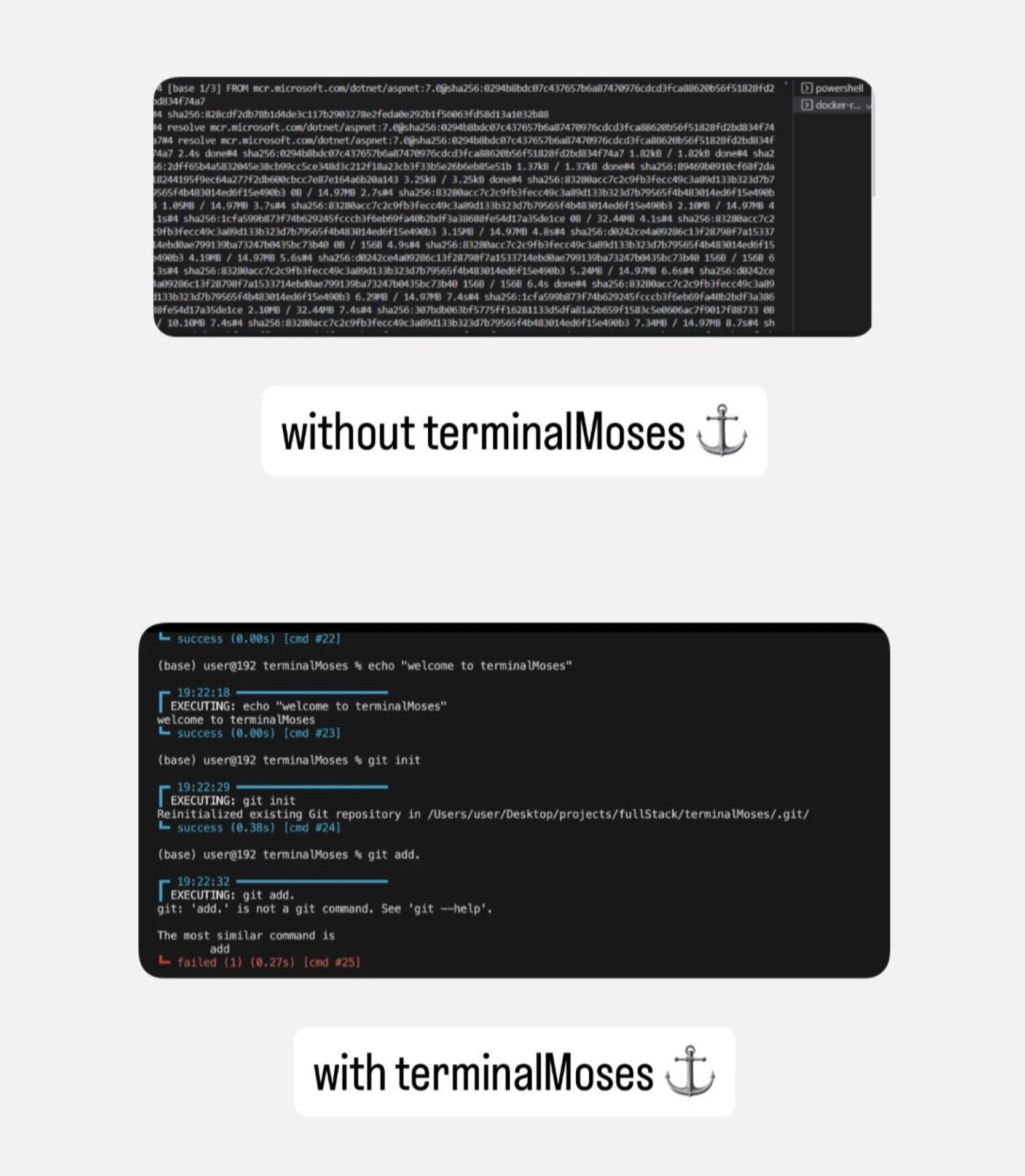
Stop wading through chaotic terminal logs. TerminalMoses acts like a smart separator for your terminal, visually parting log streams into distinct command sessions. It automatically tracks timestamps, calculates session durations, and highlights success or failure markers so you instantly spot where a process choked. With a 1-second curl install, it brings powerful debugging insights to your shell workflow without heavy configuration.
Debugging long processes or copy-pasting errors into AI always meant scrolling through an annoying, endless wall of text where everything blended together
I didn't want a heavy, bloated GUI log viewer, so I built a lightweight, Unix-style solution to part the sea of logs.
Instead of a continuous stream, TerminalMoses breaks your logs down into clean, visual command sessions. It automatically injects: - Timestamps & exact session durations - Clear success/failure markers - Custom thematic coloring - A "minimal" mode for tight spaces
It takes exactly one second to install and plugs right into your existing shell workflow. It’s entirely open-source, and I’d love to hear your feedback or any specific features you'd like to see added next.
No comment highlights available yet. Please check back later!
About TerminalMoses on Product Hunt
“Parting the sea of logs for developers who hate scrolling”
TerminalMoses was submitted on Product Hunt and earned 3 upvotes and 1 comments, placing #160 on the daily leaderboard. Stop wading through chaotic terminal logs. TerminalMoses acts like a smart separator for your terminal, visually parting log streams into distinct command sessions. It automatically tracks timestamps, calculates session durations, and highlights success or failure markers so you instantly spot where a process choked. With a 1-second curl install, it brings powerful debugging insights to your shell workflow without heavy configuration.
TerminalMoses was featured in Productivity (663.4k followers), Open Source (69k followers), Developer Tools (521.4k followers) and GitHub (41.4k followers) on Product Hunt. Together, these topics include over 307.7k products, making this a competitive space to launch in.
Who hunted TerminalMoses?
TerminalMoses was hunted by Tejaansh . A “hunter” on Product Hunt is the community member who submits a product to the platform — uploading the images, the link, and tagging the makers behind it. Hunters typically write the first comment explaining why a product is worth attention, and their followers are notified the moment they post. Around 79% of featured launches on Product Hunt are self-hunted by their makers, but a well-known hunter still acts as a signal of quality to the rest of the community. See the full all-time top hunters leaderboard to discover who is shaping the Product Hunt ecosystem.
Want to see how TerminalMoses stacked up against nearby launches in real time? Check out the live launch dashboard for upvote speed charts, proximity comparisons, and more analytics.

 Tejaansh
Yo Product Hunt!
I built TerminalMoses out of pure frustration.
Debugging long processes or copy-pasting errors into AI always meant scrolling through an annoying, endless wall of text where everything blended together
I didn't want a heavy, bloated GUI log viewer, so I built a lightweight, Unix-style solution to part the sea of logs.
Instead of a continuous stream, TerminalMoses breaks your logs down into clean, visual command sessions. It automatically injects:
- Timestamps & exact session durations
- Clear success/failure markers
- Custom thematic coloring
- A "minimal" mode for tight spaces
It takes exactly one second to install and plugs right into your existing shell workflow. It’s entirely open-source, and I’d love to hear your feedback or any specific features you'd like to see added next.
Let's make terminal debugging readable! 🚀