This product was not featured by Product Hunt yet. It will not be visible on their landing page and won't be ranked (cannot win product of the day regardless of upvotes).
Snapt
Snap a receipt. Real YNAB splits. Your categories.
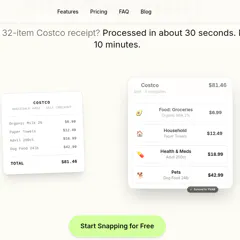
Snapt is a receipt scanner built for people who already use YNAB. You upload a photo in the browser (or send it on Telegram). Snapt reads every line, maps items to your real YNAB categories, and shows you the split before anything syncs. Costco runs with 30+ items. Amazon invoices with stuff in five categories. Same flow. It is listed on Works with YNAB. Nothing writes to your budget until you say so. Tweaks are plain English: "put the Advil in Health." Free to try (5 receipts, no card). Browser
Hey Product Hunt. David here. I built Snapt because I was losing hours every month turning Costco and Amazon receipts into YNAB splits by hand.
YNAB already has the categories I trust. I did not want another budgeting app. I wanted something that reads the receipt, proposes the split in my categories, and waits for me to approve before syncing.
What it does today:
- Works with YNAB (official listing)
- Browser upload at usesnapt.com (no install)
- Costco-style line item splits
- Amazon invoice PDFs (Plus)
- Plain-English tweaks before sync
- Optional Telegram bot for phone snaps
Honest limits: you need an active YNAB account. Free trial is 5 receipts. PDF / multi-card stuff sits on Plus.
If you try it, the path that matters to me is: sign up → connect YNAB → sync one real receipt. I would love feedback from people who already live in YNAB, especially if a split looks wrong or a category guess is off.
No comment highlights available yet. Please check back later!
About Snapt on Product Hunt
“Snap a receipt. Real YNAB splits. Your categories.”
Snapt was submitted on Product Hunt and earned 2 upvotes and 1 comments, placing #154 on the daily leaderboard. Snapt is a receipt scanner built for people who already use YNAB. You upload a photo in the browser (or send it on Telegram). Snapt reads every line, maps items to your real YNAB categories, and shows you the split before anything syncs. Costco runs with 30+ items. Amazon invoices with stuff in five categories. Same flow. It is listed on Works with YNAB. Nothing writes to your budget until you say so. Tweaks are plain English: "put the Advil in Health." Free to try (5 receipts, no card). Browser
Snapt was featured in Productivity (663.9k followers) and Fintech (47.7k followers) on Product Hunt. Together, these topics include over 192.7k products, making this a competitive space to launch in.
Who hunted Snapt?
Snapt was hunted by David Davila. A “hunter” on Product Hunt is the community member who submits a product to the platform — uploading the images, the link, and tagging the makers behind it. Hunters typically write the first comment explaining why a product is worth attention, and their followers are notified the moment they post. Around 79% of featured launches on Product Hunt are self-hunted by their makers, but a well-known hunter still acts as a signal of quality to the rest of the community. See the full all-time top hunters leaderboard to discover who is shaping the Product Hunt ecosystem.
Want to see how Snapt stacked up against nearby launches in real time? Check out the live launch dashboard for upvote speed charts, proximity comparisons, and more analytics.

 David Davila
Hey Product Hunt. David here. I built Snapt because I was losing hours every month turning Costco and Amazon receipts into YNAB splits by hand.
YNAB already has the categories I trust. I did not want another budgeting app. I wanted something that reads the receipt, proposes the split in my categories, and waits for me to approve before syncing.
What it does today:
- Works with YNAB (official listing)
- Browser upload at usesnapt.com (no install)
- Costco-style line item splits
- Amazon invoice PDFs (Plus)
- Plain-English tweaks before sync
- Optional Telegram bot for phone snaps
Honest limits: you need an active YNAB account. Free trial is 5 receipts. PDF / multi-card stuff sits on Plus.
If you try it, the path that matters to me is: sign up → connect YNAB → sync one real receipt. I would love feedback from people who already live in YNAB, especially if a split looks wrong or a category guess is off.
Questions welcome.