Count materials, parts, products and crops from a photo. Tap three examples and SmartCheck detects similar objects, shows their positions, and lets you review, correct and save the result. No installation or object-specific training data needed. Try 10 counts without signing in. Built by students at Tokyo University of Science. Results depend on the objects and photo conditions.
Hi Product Hunt 👋 I’m Hiro, a master’s student at Tokyo University of Science and the maker of SmartCheck.
SmartCheck lets you count similar objects in a photo by tapping just 3 examples.
With task-specific AI counting, you may need to collect images, label data, and retrain a model before you can even test a new object. SmartCheck is designed to let you start with just a photo and 3 taps.
✨ How it works
Take or upload a photo
Tap 3 examples of what you want to count
SmartCheck finds similar objects and shows both the count and detected positions
In real-world operations, the number alone isn’t always enough — you also need to know what the AI actually counted.

SmartCheck isn’t perfect yet. Complex cross-sections, objects with holes, and angled photos can still cause missed or duplicate detections.
That’s why SmartCheck shows every detected position, so you can review the result, correct mistakes if needed, and save it.
You can also save the setup as an AI Template and reuse it on future photos.
🛠 Built with GPT-6 Astra
I used GPT-6 Astra across much of the process — from product and UI design to implementation, iteration, and even the launch graphics and 30-second demo video.
As a student maker, it helped me move much faster between designing, building, debugging, and launching.
🚀 Try SmartCheck
✓ No app installation ✓ No sign-up required ✓ 10 free scans to start
I’d especially love to hear from the Product Hunt community:
💬 What do you repeatedly count in your work today? 💬 What would you need before trusting AI-assisted counting in a real workflow?
Feedback on cases where SmartCheck doesn’t work well yet is especially valuable 🙏
About SmartCheck on Product Hunt
“Count objects in a photo with three example taps”
SmartCheck launched on Product Hunt on September 18th, 2026 and earned 58 upvotes and 3 comments, placing #66 on the daily leaderboard. Count materials, parts, products and crops from a photo. Tap three examples and SmartCheck detects similar objects, shows their positions, and lets you review, correct and save the result. No installation or object-specific training data needed. Try 10 counts without signing in. Built by students at Tokyo University of Science. Results depend on the objects and photo conditions.
SmartCheck was featured in Productivity (663.3k followers), Artificial Intelligence (481.3k followers) and OpenAI Day (50 followers) on Product Hunt. Together, these topics include over 300k products, making this a competitive space to launch in.
Who hunted SmartCheck?
SmartCheck was hunted by Hiro. A “hunter” on Product Hunt is the community member who submits a product to the platform — uploading the images, the link, and tagging the makers behind it. Hunters typically write the first comment explaining why a product is worth attention, and their followers are notified the moment they post. Around 79% of featured launches on Product Hunt are self-hunted by their makers, but a well-known hunter still acts as a signal of quality to the rest of the community. See the full all-time top hunters leaderboard to discover who is shaping the Product Hunt ecosystem.
Want to see how SmartCheck stacked up against nearby launches in real time? Check out the live launch dashboard for upvote speed charts, proximity comparisons, and more analytics.


 Hiro
Hiro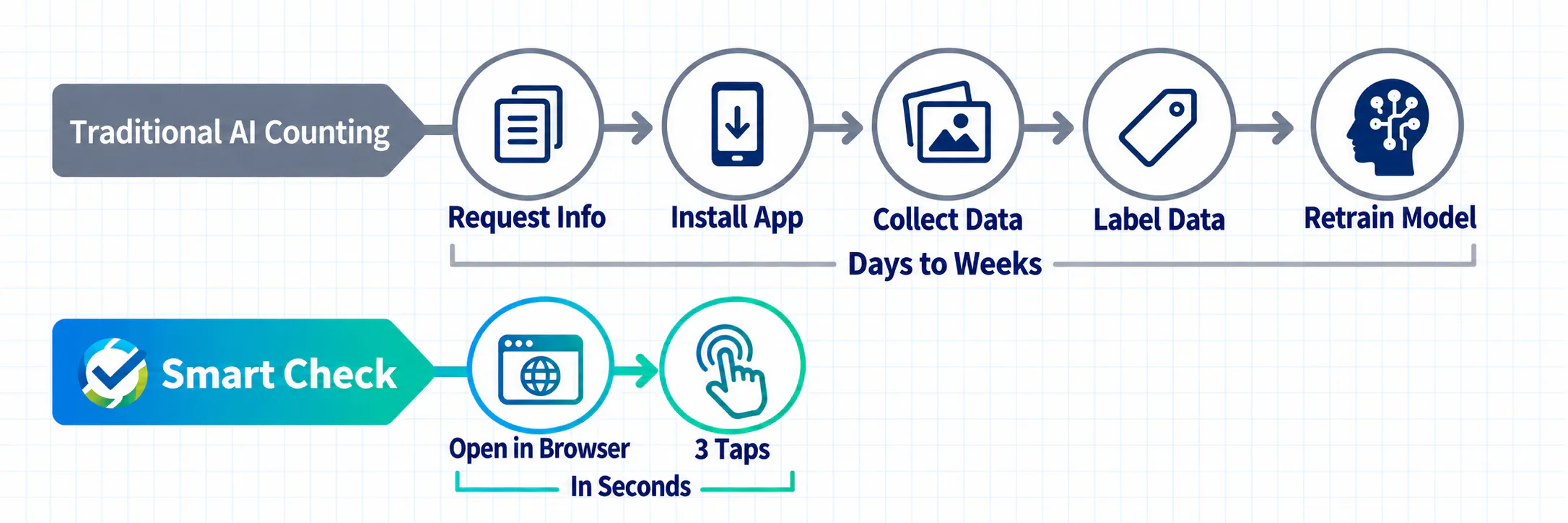
The fact that there’s no object specific training needed is a pretty interesting approach. That keeps the process straightforward.