This product was not featured by Product Hunt yet. It will not be visible on their landing page and won't be ranked (cannot win product of the day regardless of upvotes).
ImgIng
A whole image toolkit in one page — your files stay local
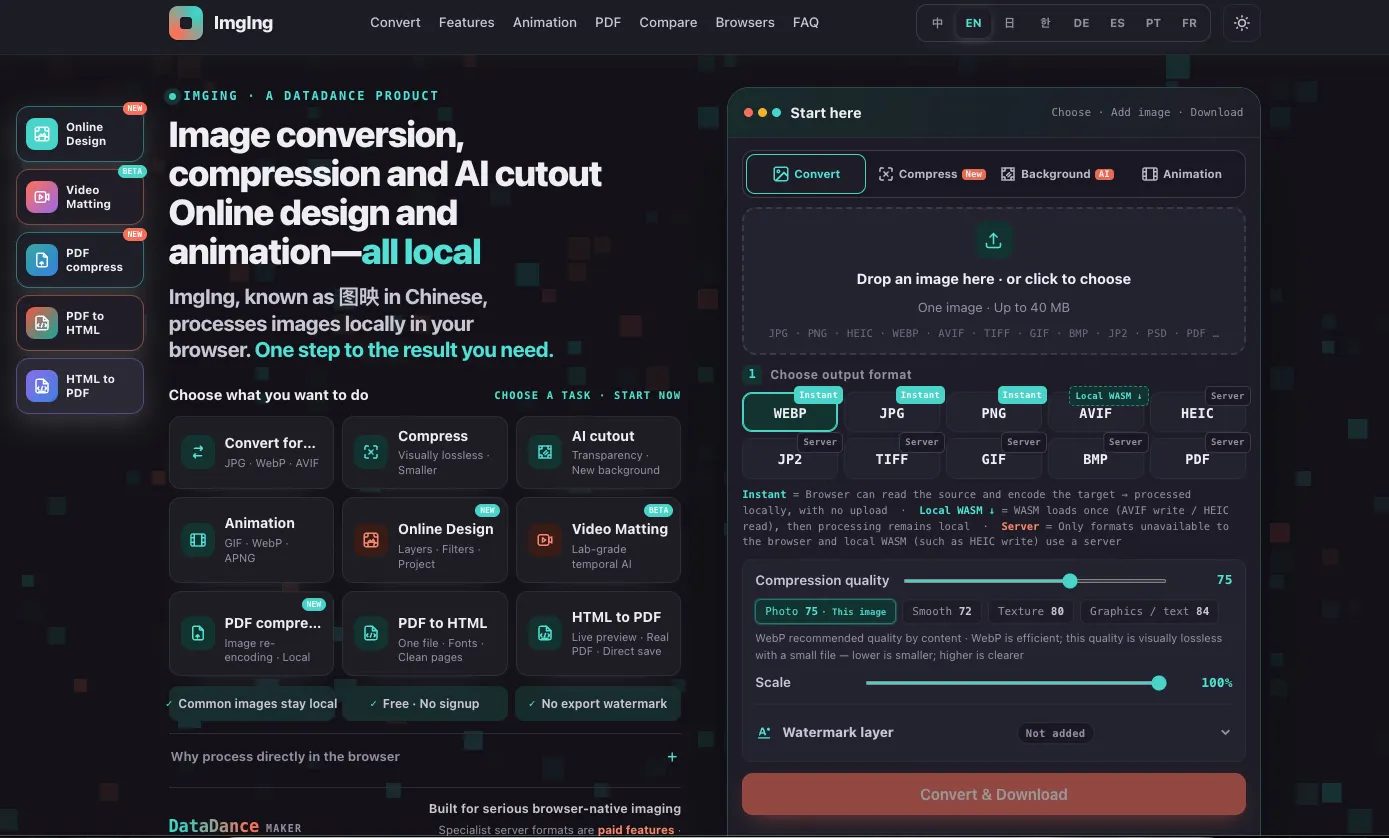
ImgIng is a full image toolkit that runs in your browser — convert, compress, remove backgrounds, edit animations, design, and shrink PDFs, all on one page. No app, no account, no watermark, no limits. For everyday formats your images never leave your device — prove it yourself: open DevTools → Network and compress one, you'll see zero upload requests. A few pro formats (HEIC encode, TIFF, image-to-PDF) run server-side and are clearly labeled first. Free, no sign-up, works on mobile too.
Hi Product Hunt 👋
Most online image tools start by uploading your photo to a server. For a meme that's fine — for an ID scan, a contract, or a medical image, it's not. There's a second annoyance too: you compress on one site, convert on another, cut out a background on a third — re-uploading and re-learning a UI every time.
We wanted one page that does all of it, locally. So ImgIng runs the everyday work — convert, compress, AI background removal, animation editing, PDF compression — right in your browser. You don't have to take our word for it: open DevTools → Network and compress an image; you'll see zero upload requests, only local blob: URLs.
Two things surprised us while building it:
1) Animation is where most tools stop. We ended up writing our own encoders for GIF, APNG, animated WebP and animated AVIF, all client-side, with frame-by-frame editing. Inter-frame diffing took one test GIF from 843 KB to 350 KB.
2) Being honest about limits made the product better, not worse. A few professional formats (HEIC encoding, TIFF, JPEG 2000, image-to-PDF) genuinely can't run in a browser today, so those go server-side — clearly labeled before you act, originals discarded and never stored. Pure-text PDFs only shrink 5–20%, and we say so instead of overpromising.
A couple of numbers, with honest scope: our self-built PNG-8 quantizer reached 45.8 dB PSNR on a reference sample (pngquant was 43.4 dB on that same sample — one sample, not a universal claim), and a PNG can encode to a 913-byte real AVIF right in the browser. Credit where due: browser-side AVIF/WebP encoding was pioneered by Squoosh, and our AVIF writer builds on the same libavif engine.
It's free — no sign-up, no watermark, no limits — and works on mobile too (including iPhone WeChat/Safari). Video background removal is live as a Beta on desktop Chrome/Edge.
Would love your feedback, especially edge cases where it fails. Open the Network tab while you compress — that's the whole pitch. 🙏
No comment highlights available yet. Please check back later!
About ImgIng on Product Hunt
“A whole image toolkit in one page — your files stay local”
ImgIng was submitted on Product Hunt and earned 0 upvotes and 1 comments, placing #68 on the daily leaderboard. ImgIng is a full image toolkit that runs in your browser — convert, compress, remove backgrounds, edit animations, design, and shrink PDFs, all on one page. No app, no account, no watermark, no limits. For everyday formats your images never leave your device — prove it yourself: open DevTools → Network and compress one, you'll see zero upload requests. A few pro formats (HEIC encode, TIFF, image-to-PDF) run server-side and are clearly labeled first. Free, no sign-up, works on mobile too.
ImgIng was featured in Design Tools (263.6k followers) and Photography (143.5k followers) on Product Hunt. Together, these topics include over 60.1k products, making this a competitive space to launch in.
Who hunted ImgIng?
ImgIng was hunted by lank. A “hunter” on Product Hunt is the community member who submits a product to the platform — uploading the images, the link, and tagging the makers behind it. Hunters typically write the first comment explaining why a product is worth attention, and their followers are notified the moment they post. Around 79% of featured launches on Product Hunt are self-hunted by their makers, but a well-known hunter still acts as a signal of quality to the rest of the community. See the full all-time top hunters leaderboard to discover who is shaping the Product Hunt ecosystem.
Want to see how ImgIng stacked up against nearby launches in real time? Check out the live launch dashboard for upvote speed charts, proximity comparisons, and more analytics.

 lank
lank