This product was not featured by Product Hunt yet. It will not be visible on their landing page and won't be ranked (cannot win product of the day regardless of upvotes).
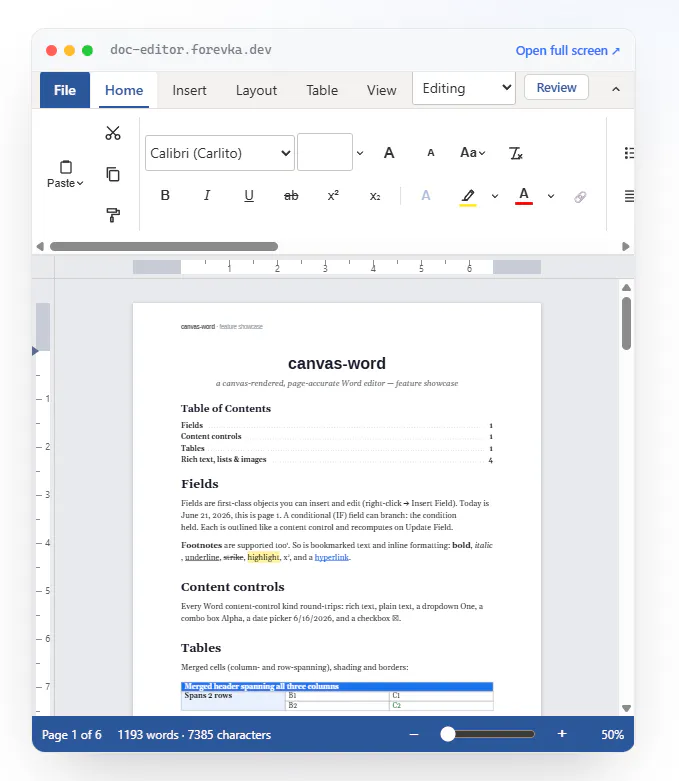
Add a Word-class document editor to your product without the six-month build. Canvas-rendered, DOCX + PDF in the browser, live collaboration, track changes. MIT-licensed, zero runtime dependencies.
A while back I needed to put a real Word editor inside a web app - open a .docx, edit it, export it back, ideally with collaboration. Every option pushed me into the same corner: the commercial editors (Syncfusion, OnlyOffice, DevExpress) are great but bill per seat and usually need a server running before they'll even render a page. And a contenteditable div falls apart the moment you hit page breaks, real DOCX export, or print-accurate PDF.
So I built the thing I wanted:
- Canvas-rendered, paginates exactly like Word (no contenteditable) - Real DOCX + PDF import/export, fully in the browser - MIT-licensed, zero runtime dependencies, no server required to render - Optional live collaboration, track changes & comments - Same engine runs headless on Node, so a server-generated PDF is pixel-identical to what's on screen
You drop it in with one import and a <div>.
It's also on npm:
npm install @forevka/wordcanvas
The whole thing (editor + examples) is live and open-source — try breaking it, open a weird .docx, export a PDF. I'd genuinely love feedback on where it falls short.
No comment highlights available yet. Please check back later!
About Embeddable Word-compatible editor on Product Hunt
“Put a Word-class editor in your product”
Embeddable Word-compatible editor was submitted on Product Hunt and earned 0 upvotes and 1 comments, placing #46 on the daily leaderboard. Add a Word-class document editor to your product without the six-month build. Canvas-rendered, DOCX + PDF in the browser, live collaboration, track changes. MIT-licensed, zero runtime dependencies.
Embeddable Word-compatible editor was featured in Open Source (69k followers), Developer Tools (521.5k followers) and GitHub (41.4k followers) on Product Hunt. Together, these topics include over 138.6k products, making this a competitive space to launch in.
Who hunted Embeddable Word-compatible editor?
Embeddable Word-compatible editor was hunted by Forevka Forevka. A “hunter” on Product Hunt is the community member who submits a product to the platform — uploading the images, the link, and tagging the makers behind it. Hunters typically write the first comment explaining why a product is worth attention, and their followers are notified the moment they post. Around 79% of featured launches on Product Hunt are self-hunted by their makers, but a well-known hunter still acts as a signal of quality to the rest of the community. See the full all-time top hunters leaderboard to discover who is shaping the Product Hunt ecosystem.
Want to see how Embeddable Word-compatible editor stacked up against nearby launches in real time? Check out the live launch dashboard for upvote speed charts, proximity comparisons, and more analytics.

 Forevka Forevka
Hey Product Hunt 👋
I'm Bohdan, the maker of WordCanvas.
A while back I needed to put a real Word editor inside a web app - open a .docx, edit it, export it back, ideally with collaboration. Every option pushed me into the same corner: the commercial editors (Syncfusion, OnlyOffice, DevExpress) are great but bill per seat and usually need a server running before they'll even render a page. And a contenteditable div falls apart the moment you hit page breaks, real DOCX export, or print-accurate PDF.
So I built the thing I wanted:
- Canvas-rendered, paginates exactly like Word (no contenteditable)
- Real DOCX + PDF import/export, fully in the browser
- MIT-licensed, zero runtime dependencies, no server required to render
- Optional live collaboration, track changes & comments
- Same engine runs headless on Node, so a server-generated PDF is pixel-identical to what's on screen
You drop it in with one import and a <div>.
It's also on npm:
The whole thing (editor + examples) is live and open-source — try breaking it, open a weird .docx, export a PDF. I'd genuinely love feedback on where it falls short.