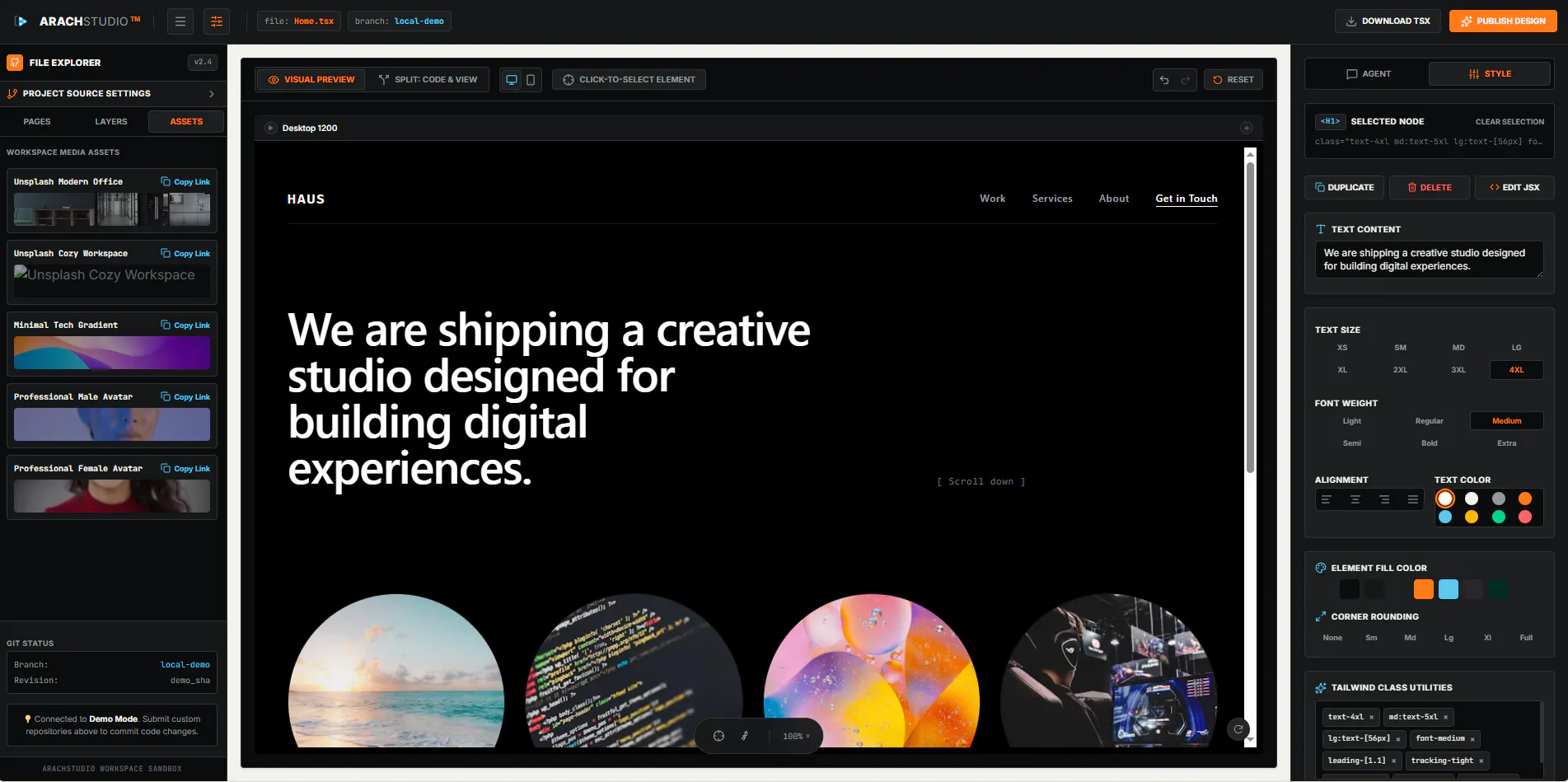
Hi Product Hunt! 👋 ArachStudio helps designers & developers live-edit codebases & components online. How it works: Connect GitHub via access token. Scan & load your project path. Make real-time style edits in the visual preview (desktop/mobile). Export the final product! Help us decide: We are testing two different demo versions. Try both links and tell us which experience you prefer in the comments!
Hi Product Hunt! 👋 I’m Khajieh Manbourian, and I'm incredibly excited to share ArachStudio with you today.
The inspiration for this tool actually came out of my own personal frustration. Just as Linus Torvalds built Git because he needed a better way to build Linux, I built ArachStudio out of sheer necessity while working on my other product, ArachTech.
The Problem: I desperately needed a way to ship faster, perform live edits seamlessly, and speed up deployments. The traditional cycle of coding, previewing, and pushing just felt too slow and disconnected for the speed I wanted to move at.
The Solution: I built ArachStudio to bridge that gap. It allows you to connect your GitHub repo and visually live-edit your components right in the browser.
I designed this specifically for:
"Vibe coders" who want to build and iterate quickly by feel.
New web designers looking for an easier bridge into code.
Component editors who need a frictionless way to develop, tweak, push, and deploy.
I need your help!
To get this right, I’ve included two different demo links in the launch above. I want to know which workflow and experience feels better to you.
Please take both demos for a spin, test out the live editing, and let me know in the comments: Which version do you prefer and what feature should I build next?
Thank you so much for your support! 🚀
Hey Product Hunt! I would like to invite you to test v2 of the product on our official website, studio.arachtech.am. By registering, you will get a 1-month free subscription, which can be extended until the official launch of the website. No credit card information is required.
The live desktop/mobile preview while editing styles is really helpful. Before pointing it at a real repo though, the thing I'd want to know is whether export opens a reviewable branch or commits straight to main, and what scope the GitHub token needs.
The GitHub-token connect step is the part I'd want to understand before pointing this at a real repo, since a token that can push edits is a broad grant. When I connect, does ArachStudio take a fine-grained token scoped to one repo, and is it held client-side in my session or stored server-side against my account? On export, does it commit straight to the connected branch or open a separate branch so I can review the diff before it lands?
Honestly the live mobile/desktop preview toggle is a really smart touch, makes it way easier to catch responsive issues on the fly. And connecting directly through a GitHub token instead of some custom sync feels like the right call, basically no extra setup friction.
a few people in the thread are praising how painless the GitHub token setup is, that's actually the part that'd make me pause. what scope does the token need, can it be limited to a single repo, or does it need broader account access? and is it ever persisted on your servers or only held client-side for the session?
The visual preview idea is genuinely useful, but consider adding a quick "share preview" link that generates a public URL with the live edits applied. Designers often need to send work to stakeholders before pushing a PR, and right now there's no obvious way to share progress without exporting first.
The real-time mobile preview toggle is such a thoughtful touch, makes it way easier to catch responsive issues on the fly rather than switching windows constantly.
The visual preview switching between desktop and mobile on the fly is such a smart touch, saves so much back-and-forth. Excited to dig into both demos and see which feels right.
The live-edit preview that switches between desktop and mobile on the fly is genuinely useful, especially being able to push those style changes straight back to GitHub without leaving the browser.
Connected my GitHub and the live preview synced way faster than I expected, especially the mobile breakpoint toggle. The visual edit feedback felt instant, though the export flow took a couple of clicks to find.
Love how clean the live preview toggles between desktop and mobile without losing your scroll position. The GitHub token flow is refreshingly straightforward, no OAuth detour needed just to try it out.
Tried both demos and the second one felt way smoother, the live preview actually matched what I was editing instead of lagging behind. Love that it pulls straight from GitHub without needing a full repo clone.
Love that you can plug in your own repo and start tweaking right away. One thing that would make this way more useful for me: a way to commit the visual edits back as a pull request with a diff preview so the team can review before merge. Right now exporting feels disconnected from the normal git flow.
Live-editing a connected GitHub repo in the browser with a live desktop/mobile preview is genuinely impressive, especially how cleanly the path scan loads without extra config. Curious how you handle conflicts if someone edits locally while the visual session is open.
this is actually pretty slick, I connected my github and edited some tailwind classes in real time which felt kind of magical. the mobile preview toggle is really handy too
Tried version A and the live preview felt really snappy when tweaking CSS on my phone view. The GitHub token setup was painless too, which is rare for tools like this.
This looks really handy for quick style tweaks without firing up a whole editor. One thing that would make it a lot more useful for me would be a way to leave inline comments or annotations on specific elements while editing, so I can flag things for my dev teammate without exporting and sending screenshots back and forth.
Congrats on the launch. The live-edit preview idea is genuinely useful, especially being able to switch between desktop and mobile while tweaking styles. One thing I'd love to see is a diff view right inside the editor before exporting, so I can review exactly which lines changed in each file. That would make it way easier to catch accidental edits before pushing back to GitHub.
Live-editing components directly from GitHub is a really smooth workflow. One thing that would make it even better would be a git-aware diff view showing which CSS or prop values changed before exporting, so I can review the impact before pulling the changes back into my repo.
About ArachStudio on Product Hunt
“Live-edit your GitHub components directly in the browser”
ArachStudio launched on Product Hunt on July 21st, 2026 and earned 106 upvotes and 33 comments, placing #25 on the daily leaderboard. Hi Product Hunt! 👋 ArachStudio helps designers & developers live-edit codebases & components online. How it works: Connect GitHub via access token. Scan & load your project path. Make real-time style edits in the visual preview (desktop/mobile). Export the final product! Help us decide: We are testing two different demo versions. Try both links and tell us which experience you prefer in the comments!
ArachStudio was featured in Design Tools (263.8k followers), Developer Tools (522.6k followers) and GitHub (41.5k followers) on Product Hunt. Together, these topics include over 173k products, making this a competitive space to launch in.
Who hunted ArachStudio ?
ArachStudio was hunted by Khajieh Manpourian. A “hunter” on Product Hunt is the community member who submits a product to the platform — uploading the images, the link, and tagging the makers behind it. Hunters typically write the first comment explaining why a product is worth attention, and their followers are notified the moment they post. Around 79% of featured launches on Product Hunt are self-hunted by their makers, but a well-known hunter still acts as a signal of quality to the rest of the community. See the full all-time top hunters leaderboard to discover who is shaping the Product Hunt ecosystem.
Want to see how ArachStudio stacked up against nearby launches in real time? Check out the live launch dashboard for upvote speed charts, proximity comparisons, and more analytics.

 Khajieh Manpourian