This product was not featured by Product Hunt yet. It will not be visible on their landing page and won't be ranked (cannot win product of the day regardless of upvotes).
Product upvotes vs the next 3
Waiting for data. Loading
Product comments vs the next 3
Waiting for data. Loading
Product upvote speed vs the next 3
Waiting for data. Loading
Product upvotes and comments
Waiting for data. Loading
Product vs the next 3
Loading
ZenTube Focus
Block distractions and manage your watch time with ZenTube.
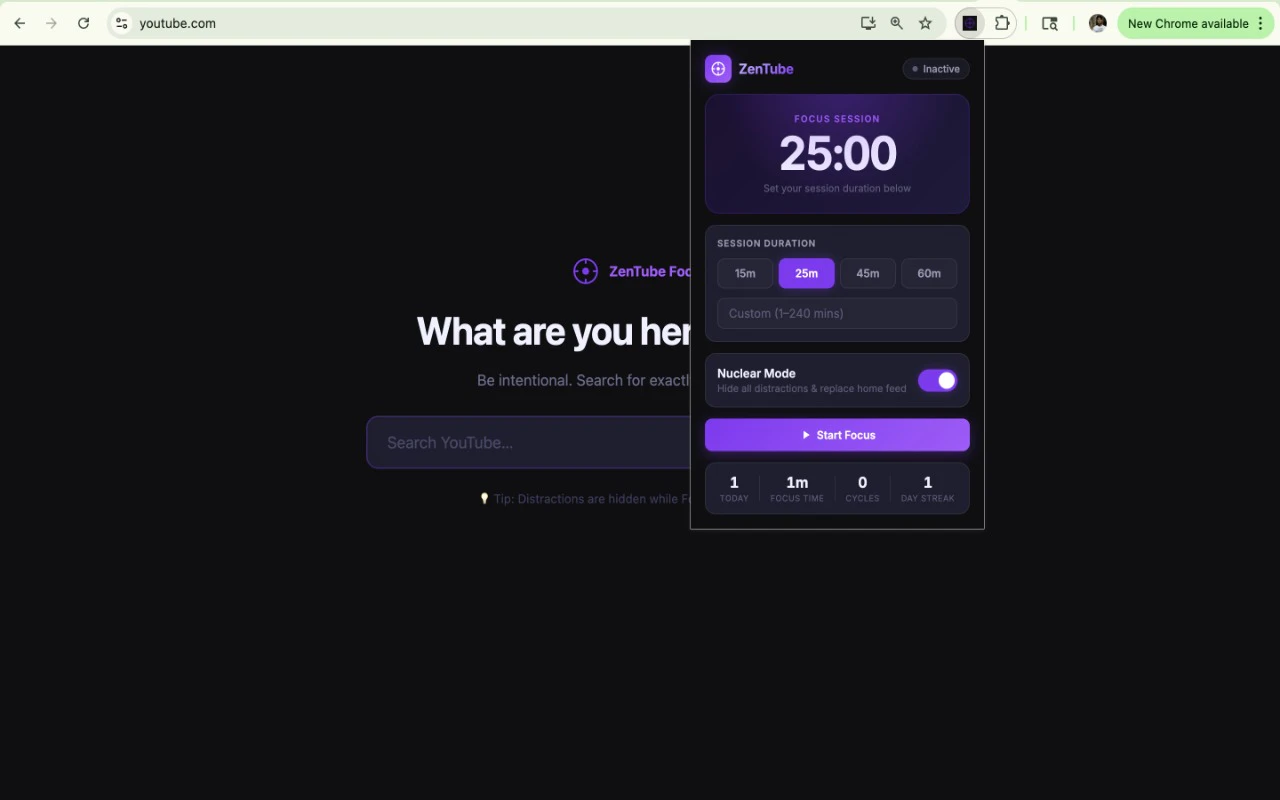
Chrome extension that turns YouTube into a pure search engine (bye-bye algorithm rabbit holes). Like a lot of you, I go to YouTube to learn something specific, but 45 minutes later, I'm watching a documentary about deep-sea creatures because the algorithm decided I needed to see it. The feed and the sidebar recommendations are just too good at distracting me. So, I built ZenTube Focus, a minimal Chrome extension designed to strip away the chaos and make YouTube an intentional tool again.
Built ZenTube Focus, a minimal Chrome extension designed to strip away the chaos and make YouTube an intentional tool again.
Here’s what it does in "Nuclear Mode":
🛑 Nukes the Home Feed: Replaces the entire homepage with a clean, distraction-free search bar asking, "What are you here to learn?"
🚫 Hides the Rabbit Holes: Completely removes the sidebar recommendations, Shorts shelf, end-screen cards, and autoplay overlays.
💬 Removes Comments: Hides the comment section so you don't get sucked into internet arguments.
☕ Built-in Break Mode: Need to unwind? You can pause Nuclear Mode and take a timed break. It gives you a banner counting down your break time, and once it's up, the lock is back on!
⚡ No Flashing: Built with robust MutationObservers, it catches YouTube's sneaky SPA (Single Page Application) navigations so you never even see a split-second flash of the home feed.
Why did I build this? There are other blockers out there, but many of them break when YouTube updates or navigates without a full page reload. I wanted something lightweight that actually respects YouTube's routing under the hood, and still looks aesthetic and modern.
If you struggle with intention-setting on YouTube, I’d love for you to give it a try. It’s completely free and open-source.
Let me know what you think, and if there are any other features you'd like to see!
About ZenTube Focus on Product Hunt
“Block distractions and manage your watch time with ZenTube.”
ZenTube Focus was submitted on Product Hunt and earned 2 upvotes and 1 comments, placing #106 on the daily leaderboard. Chrome extension that turns YouTube into a pure search engine (bye-bye algorithm rabbit holes). Like a lot of you, I go to YouTube to learn something specific, but 45 minutes later, I'm watching a documentary about deep-sea creatures because the algorithm decided I needed to see it. The feed and the sidebar recommendations are just too good at distracting me. So, I built ZenTube Focus, a minimal Chrome extension designed to strip away the chaos and make YouTube an intentional tool again.
On the analytics side, ZenTube Focus competes within Browser Extensions, Chrome Extensions, Productivity and YouTube — topics that collectively have 738.6k followers on Product Hunt. The dashboard above tracks how ZenTube Focus performed against the three products that launched closest to it on the same day.
Who hunted ZenTube Focus?
ZenTube Focus was hunted by Arijeet Singh. A “hunter” on Product Hunt is the community member who submits a product to the platform — uploading the images, the link, and tagging the makers behind it. Hunters typically write the first comment explaining why a product is worth attention, and their followers are notified the moment they post. Around 79% of featured launches on Product Hunt are self-hunted by their makers, but a well-known hunter still acts as a signal of quality to the rest of the community. See the full all-time top hunters leaderboard to discover who is shaping the Product Hunt ecosystem.
For a complete overview of ZenTube Focus including community comment highlights and product details, visit the product overview.

 Arijeet Singh