This product was not featured by Product Hunt yet. It will not be visible on their landing page and won't be ranked (cannot win product of the day regardless of upvotes).
Product upvotes vs the next 3
Waiting for data. Loading
Product comments vs the next 3
Waiting for data. Loading
Product upvote speed vs the next 3
Waiting for data. Loading
Product upvotes and comments
Waiting for data. Loading
Product vs the next 3
Loading
Snapshot — Screenshot Tool
Screenshot, annotate, and share — free, no signup
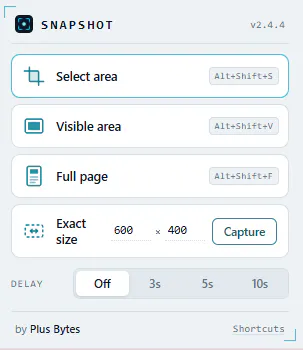
Snapshot captures any page 4 ways — visible area, drag-select (with auto-scroll), exact pixel size, or full-page stitching, even on pages with independent scroll panes. Every capture opens in a built-in editor to annotate, redact, and export as JPG/PNG/PDF before you save.
Hey Product Hunt 👋
I built Snapshot because every screenshot tool I tried made me choose between "fast and basic" or "full editor but bloated." Snapshot tries to be neither compromise:
4 capture modes — visible area, drag-to-select (auto-scrolls past one screen), exact pixel dimensions, and full-page stitching — including pages with independently scrolling panels (dashboards, docs sites, etc.), not just the window.
Built-in editor — every capture opens in a full annotation tab first: arrows, shapes, callout text, redaction eraser, zoom, undo/redo. Nothing saves until you say so.
Export anywhere — JPG, PNG, or PDF, download or straight to clipboard.
Keyboard shortcuts for all three main modes, and a share panel to send captures without leaving the tab.
Zero tracking — no host permissions, no analytics, no network calls. Everything happens on your machine.
Free, no signup, no limits. Would love feedback from this community — especially if you hit a page that breaks a capture mode, since that's exactly the kind of edge case I want to know about.
About Snapshot — Screenshot Tool on Product Hunt
“Screenshot, annotate, and share — free, no signup”
Snapshot — Screenshot Tool was submitted on Product Hunt and earned 2 upvotes and 1 comments, placing #100 on the daily leaderboard. Snapshot captures any page 4 ways — visible area, drag-select (with auto-scroll), exact pixel size, or full-page stitching, even on pages with independent scroll panes. Every capture opens in a built-in editor to annotate, redact, and export as JPG/PNG/PDF before you save.
On the analytics side, Snapshot — Screenshot Tool competes within Chrome Extensions — topics that collectively have 52.8k followers on Product Hunt. The dashboard above tracks how Snapshot — Screenshot Tool performed against the three products that launched closest to it on the same day.
Who hunted Snapshot — Screenshot Tool?
Snapshot — Screenshot Tool was hunted by Puneet Badam. A “hunter” on Product Hunt is the community member who submits a product to the platform — uploading the images, the link, and tagging the makers behind it. Hunters typically write the first comment explaining why a product is worth attention, and their followers are notified the moment they post. Around 79% of featured launches on Product Hunt are self-hunted by their makers, but a well-known hunter still acts as a signal of quality to the rest of the community. See the full all-time top hunters leaderboard to discover who is shaping the Product Hunt ecosystem.
For a complete overview of Snapshot — Screenshot Tool including community comment highlights and product details, visit the product overview.

 Puneet Badam