This product was not featured by Product Hunt yet. It will not be visible on their landing page and won't be ranked (cannot win product of the day regardless of upvotes).
Product upvotes vs the next 3
Waiting for data. Loading
Product comments vs the next 3
Waiting for data. Loading
Product upvote speed vs the next 3
Waiting for data. Loading
Product upvotes and comments
Waiting for data. Loading
Product vs the next 3
Loading
PexarBolt Ultra TBT5 Dock
The First Thunderbolt5 Control Dock that Shows Your Workflow
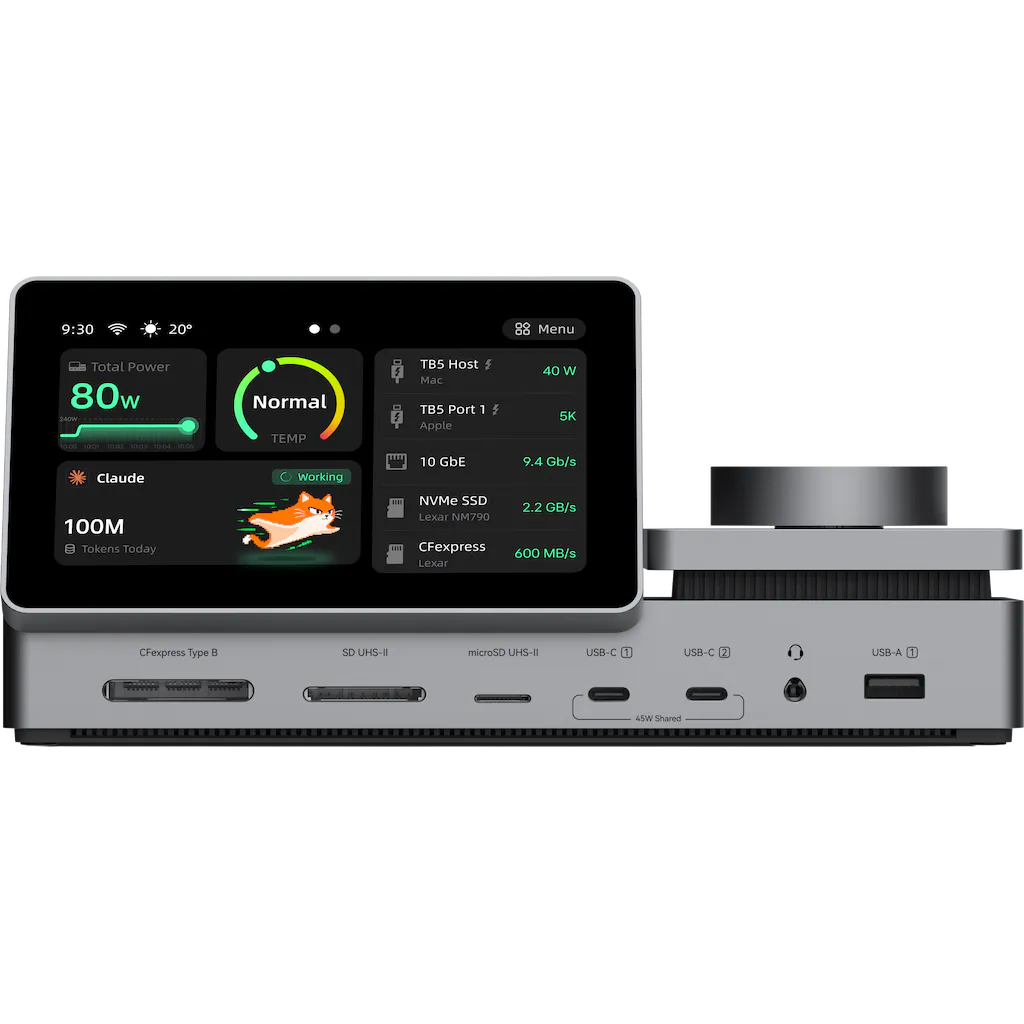
PexarBolt is a Thunderbolt 5 dock that does what no dock can: it shows you what it's doing — and lets you answer. Normally you find out something's wrong when your monitor blinks, a transfer crawls, or your laptop quietly stops charging. A built-in 5-inch touchscreen surfaces the invisible half of your workflow —— transfers, power, temperature, network, warnings, AI status — and lets you act on it. Tap to approve a Claude Code/ Codex session or switch the view, without ever leaving your work.
Hey Product Hunt 👋
I'm Wilson, founder of Pexar. Hardware obsessive — I build the thing I kept wishing someone else would build.
PexarBolt Ultra is a Thunderbolt 5 dock with a built-in 5" touchscreen. It exists because of a scene I kept watching play out:
A creator at a full desk. Every port occupied, real work on the main screen, an AI agent running in the background. To check what that agent is doing — did it finish? is it waiting for a prompt? did it quietly fail 20 minutes ago? — you drop everything, tab back to the terminal. Hands stop. Eyes split. Focus gone.
Two years ago, I was the PM lead behind the Lexar Professional GO SSD with Hub ($1M+ on Kickstarter). Back then, the job was taming storage and ports. AI wasn't in the room yet. It is now. For years, consumer electronics has been obsessed with one question: "is it fast enough?" That era is over. Spec sheets are surplus, yet our everyday workflows got more fragmented. The stronger AI gets, the less hardware should stay silent. A dock shouldn't just be a brick behind your monitor — it should be the instrument panel for the hidden half of your workflow.
What PexarBolt Ultra actually does:
Live Instrument Panel: Transfers, power, thermals, network, and live AI agent status right on the 5" display.
One-Tap Actions: Tap to approve a Claude Code, Codex session without switching windows or breaking context.
Zero-Bottleneck Chain: 80Gbps bandwidth, 10GbE, internal NVMe M.2 SSD slot, and CFexpress. Pull the card, ingest, edit on fast local NVMe, and push over 10GbE — all inside one single desktop anchor.
No renders here. Working hardware samples are running live at our IFA booth (No.101, Hall 20, Sep 4–8, 2026).
Kickstarter launches Sep 8.
If you want in early, we set up a $20 refundable VIP deposit that locks the launch price at $449 (MSRP $649.99). Full transparency: it’s a paid reservation to guarantee early allocation, but 100% refundable if you change your mind.
➔ Lock VIP Early Access: https://pexar.com/pages/pexarbol...
I’m posting here ahead of time because I’d rather hear from this crowd first. Two questions I’d genuinely love your take on:
1. Would you actually want a dedicated desk display for agent status/prompts, or is a second monitor always enough?
2. What silent part of your tech workflow currently disappears into the background and bites you later?
Doubts, critique, or hard feedback — lay it on me. I’ll be in the comments all day! 🙏
About PexarBolt Ultra TBT5 Dock on Product Hunt
“The First Thunderbolt5 Control Dock that Shows Your Workflow”
PexarBolt Ultra TBT5 Dock was submitted on Product Hunt and earned 8 upvotes and 1 comments, placing #44 on the daily leaderboard. PexarBolt is a Thunderbolt 5 dock that does what no dock can: it shows you what it's doing — and lets you answer. Normally you find out something's wrong when your monitor blinks, a transfer crawls, or your laptop quietly stops charging. A built-in 5-inch touchscreen surfaces the invisible half of your workflow —— transfers, power, temperature, network, warnings, AI status — and lets you act on it. Tap to approve a Claude Code/ Codex session or switch the view, without ever leaving your work.
On the analytics side, PexarBolt Ultra TBT5 Dock competes within Productivity, Developer Tools and Tech — topics that collectively have 1.8M followers on Product Hunt. The dashboard above tracks how PexarBolt Ultra TBT5 Dock performed against the three products that launched closest to it on the same day.
Who hunted PexarBolt Ultra TBT5 Dock?
PexarBolt Ultra TBT5 Dock was hunted by Wilson Chen. A “hunter” on Product Hunt is the community member who submits a product to the platform — uploading the images, the link, and tagging the makers behind it. Hunters typically write the first comment explaining why a product is worth attention, and their followers are notified the moment they post. Around 79% of featured launches on Product Hunt are self-hunted by their makers, but a well-known hunter still acts as a signal of quality to the rest of the community. See the full all-time top hunters leaderboard to discover who is shaping the Product Hunt ecosystem.
For a complete overview of PexarBolt Ultra TBT5 Dock including community comment highlights and product details, visit the product overview.

 Wilson Chen