A little creature that lives in your MacBook notch
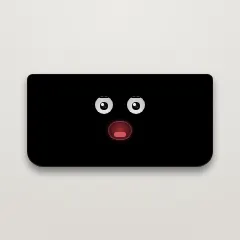
Notchling is a tiny creature living in your MacBook notch. It watches your cursor, dozes off when you idle, feels your battery, and when you drag a file at it, it opens its mouth and carries it for you. Free, under a megabyte, and nothing leaves your Mac.
Hey Product Hunt 👋
A few weeks ago I launched Crew here — little pixel monsters for your Claude
Code agents (it finished #7 of the day, thank you!). Notchling is its sibling,
and it lives one floor up: in the MacBook notch.
There are a lot of notch apps, and almost all of them turn the notch into a
dashboard — media controls, calendars, clipboard managers. Notchling is the
opposite: it's a someone, not a something. One creature. Its body language IS
the interface:
▪ It watches your cursor, blinks, gets startled if you fling the mouse at it,
and dozes off when you step away.
▪ Drag a file at it and it opens its mouth. Let go — gulp — and it carries the
file for you. Links and text snippets too. Hover to see what it's holding,
drag a chip back out, share one over AirDrop, click to open. It remembers
across restarts.
▪ It swallows time: right-click → hold 5, 15 or 25 minutes. A little countdown
chip, then a bounce and a chirp. A tea timer with a face.
▪ Drag the whole creature sideways to reach whatever fell behind it. It parks,
keeps glancing back at its spot, and drifts home a few seconds later.
▪ It feels your battery. Plugged in, it gets a warm, content flush on its
cheeks. Running low, it starts yawning. The moment you cross critical, it
shoots one worried glance at your battery icon — once, and never nags.
▪ Right-click and there's a weather toy in there too — your local sky as a tiny
living scene: a breathing sun, a cratered moon with shooting stars, rain that
splashes on the lip, snow that piles up, fog banks, forked lightning.
▪ And when you want nothing at all: Hide shrinks it to the bare hardware notch —
invisible until you click the notch (or drag a file at it) to bring it back.
▪ It knows when you're on a call: camera in use → it politely shuts its eyes.
Mic in use → a small waveform thought. It reads device state only, never
captures anything, and never triggers a permission prompt.
▪ If you use Claude Code: a small ember pulse glows under the notch while your
agents are working (hover shows which projects) — and when a session gets
blocked waiting on you, an ember mark appears, it glances down, and one click
jumps you to that terminal. It reads the same local markers as Crew.
▪ Small things it simply notices: Caps Lock on → eyes wide. Wi-Fi drops → one
puzzled look around. Disk over 90% → it looks visibly stuffed. Fifty minutes
without a break → a pointed stretch. And you can shush it for an hour.
▪ Music on? Hover for previous/play/next and the track name; scroll over the
notch to scrub. Spotify and Apple Music, via their public interfaces — no
private frameworks that break every macOS update.
▪ Fresh screenshots too: drag the little floating thumbnail straight at it.
▪ Three opt-ins, all off by default: watch Downloads (it chews while one runs,
then holds the finished file), meeting whispers (five minutes before your
next event, read-only calendar), and music.
▪ Everything it holds shows as chips — click one to open, × to remove, and
"+N" unfolds the whole shelf.
▪ It CHEWS what you feed it: right-click a held image → convert to JPEG/PNG,
shrink it, or read the text out of it (straight to your clipboard). All
on-device — Apple's own engines, given a face. The stuff other notch apps
charge $10–29 for, free.
Honest notes:
▪ macOS 13+, Apple Silicon and Intel, under 1 MB. No account, no telemetry, and no
background network calls. Exactly two things ever touch the network, and only if
you ask: the weather toy (ipapi.co to turn your IP into a rough city, then
open-meteo for the sky — no location permission involved) and the update check,
which runs when you click it and never otherwise.
▪ Idle cost is engineered hard: under half a percent CPU while it lives. I
profiled it until the fans had nothing to say.
▪ It isn't notarised yet, so a browser download gets flagged. The terminal
one-liner on the site installs without any warning (curl doesn't quarantine),
and the SHA-256 is published next to it.
▪ Completely free. Crew is the one that pays the rent.
Built in Swift, solo, with Claude Code. Happy to answer anything — the mouth,
the battery moods, or how you make a notch app cost nothing.
What else should a creature in your notch be able to feel?
About Notchling on Product Hunt
“A little creature that lives in your MacBook notch”
Notchling launched on Product Hunt on September 1st, 2026 and earned 126 upvotes and 23 comments, placing #8 on the daily leaderboard. Notchling is a tiny creature living in your MacBook notch. It watches your cursor, dozes off when you idle, feels your battery, and when you drag a file at it, it opens its mouth and carries it for you. Free, under a megabyte, and nothing leaves your Mac.
On the analytics side, Notchling competes within Mac, Design Tools and Productivity — topics that collectively have 1M followers on Product Hunt. The dashboard above tracks how Notchling performed against the three products that launched closest to it on the same day.
Who hunted Notchling?
Notchling was hunted by Ravindra Sisodia. A “hunter” on Product Hunt is the community member who submits a product to the platform — uploading the images, the link, and tagging the makers behind it. Hunters typically write the first comment explaining why a product is worth attention, and their followers are notified the moment they post. Around 79% of featured launches on Product Hunt are self-hunted by their makers, but a well-known hunter still acts as a signal of quality to the rest of the community. See the full all-time top hunters leaderboard to discover who is shaping the Product Hunt ecosystem.
For a complete overview of Notchling including community comment highlights and product details, visit the product overview.

 Ravindra Sisodia