This product was not featured by Product Hunt yet. It will not be visible on their landing page and won't be ranked (cannot win product of the day regardless of upvotes).
Product upvotes vs the next 3
Waiting for data. Loading
Product comments vs the next 3
Waiting for data. Loading
Product upvote speed vs the next 3
Waiting for data. Loading
Product upvotes and comments
Waiting for data. Loading
Product vs the next 3
Loading
My Mobile Cabinet Android App
App organizes docs by categories. Can backup to Google drive
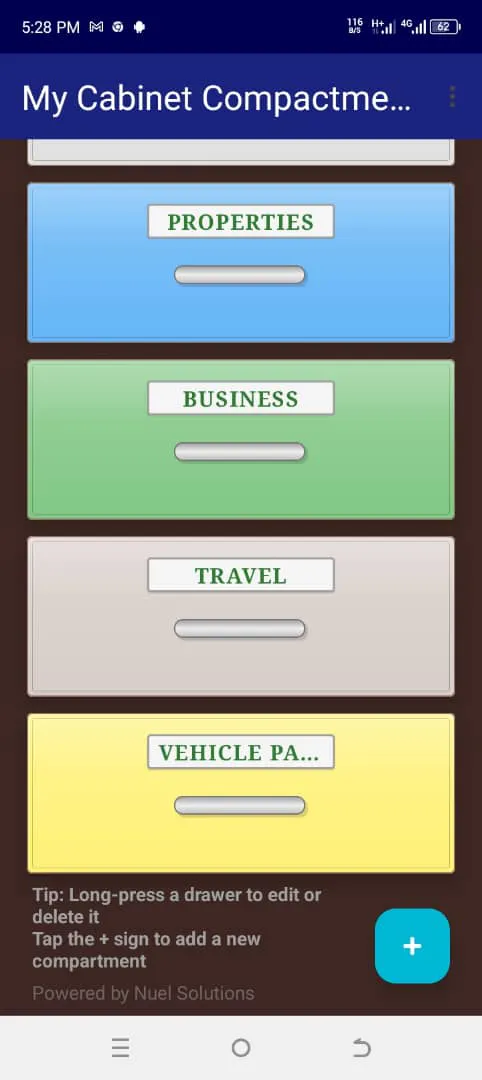
This Android Application enables users to organize their vital documents by custom categories. For example, users can create folders called compartments in the App for special life subjects like Travels, Business, Family, Properties etc so that documents are not lumped together. This App therefore makes archiving and retrieval of vital documents easier than keeping all documents together. My Mobile Cabinet gives users ability to sync their saved documents to their Google drives for security.
I developed this Application when a lot of people especially the busy working class men and women mentioned that they find it difficult to find their documents when needed because the documents are very many and the subjects are quite diverse. I also faced the same problem until I developed and deployed the Application.
In the course of testing the mobile app, testers suggested many cool features, which I added and I discovered that those features added values to the application.
Users can lock the app with their fingerprints. This ensures that the documents saved in the app are private, confidential and secure.
There is also a search panel/bar where users can pull up any documents fast without navigating to the compartment where it is housed.
My Mobile Cabinet enables users to sync all their saved documents to their Google drives. This is particularly helpful if the device (phone) has issues like having a fault, lost or stolen. Users can procure a new device, install the app to their new device and restore their saved documents to the new device. This is cool !
About My Mobile Cabinet Android App on Product Hunt
“App organizes docs by categories. Can backup to Google drive”
My Mobile Cabinet Android App was submitted on Product Hunt and earned 2 upvotes and 1 comments, placing #160 on the daily leaderboard. This Android Application enables users to organize their vital documents by custom categories. For example, users can create folders called compartments in the App for special life subjects like Travels, Business, Family, Properties etc so that documents are not lumped together. This App therefore makes archiving and retrieval of vital documents easier than keeping all documents together. My Mobile Cabinet gives users ability to sync their saved documents to their Google drives for security.
On the analytics side, My Mobile Cabinet Android App competes within Android and Productivity — topics that collectively have 721.6k followers on Product Hunt. The dashboard above tracks how My Mobile Cabinet Android App performed against the three products that launched closest to it on the same day.
Who hunted My Mobile Cabinet Android App?
My Mobile Cabinet Android App was hunted by Olatunji Omoniyi. A “hunter” on Product Hunt is the community member who submits a product to the platform — uploading the images, the link, and tagging the makers behind it. Hunters typically write the first comment explaining why a product is worth attention, and their followers are notified the moment they post. Around 79% of featured launches on Product Hunt are self-hunted by their makers, but a well-known hunter still acts as a signal of quality to the rest of the community. See the full all-time top hunters leaderboard to discover who is shaping the Product Hunt ecosystem.
For a complete overview of My Mobile Cabinet Android App including community comment highlights and product details, visit the product overview.

 Olatunji Omoniyi